How to journal Solana trades (the complete 2026 guide)
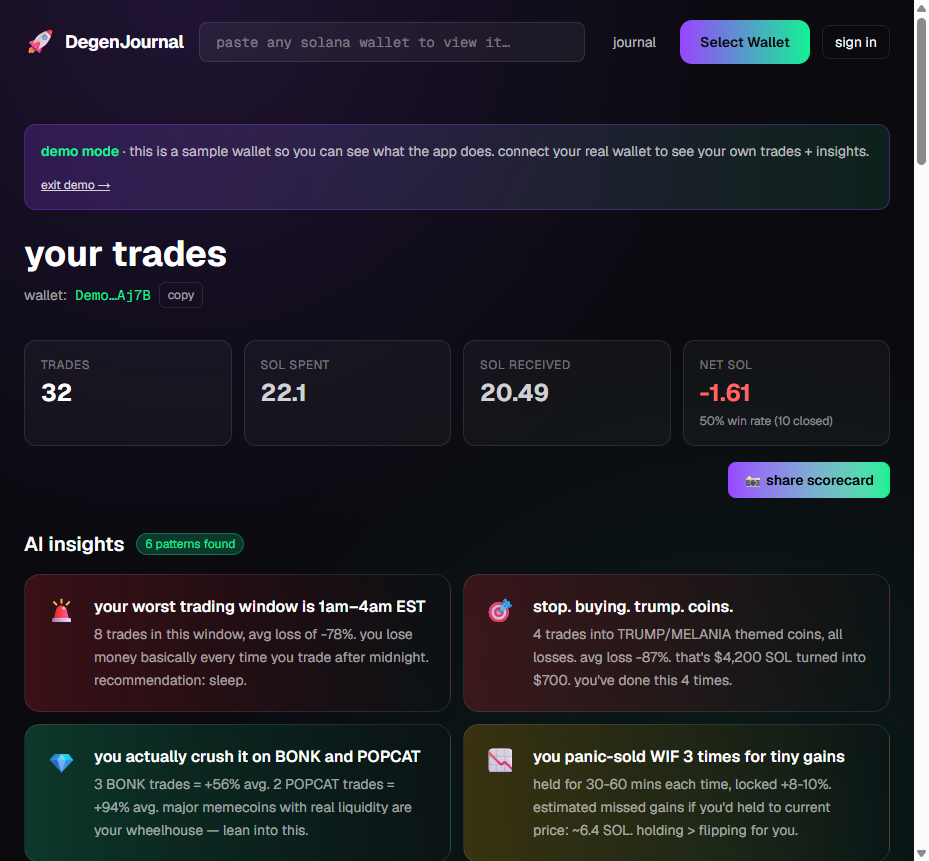
Let me show you how to journal Solana trades without turning it into a second unpaid job. If you've ever closed a green day feeling like a genius, then handed it all back the next morning making the exact same play, this is the guide that fixes the loop. Journaling is the boring habit that quietly separates traders who compound from traders who just churn their bag until it's gone. It's not glamorous. It works.
Here's the uncomfortable truth: you made 87 trades last week. You remember maybe 6. And you definitely don't remember why you aped that 4am low-liquidity ticker with half your stack. That gap between what you did and what you remember is where your SOL goes to die. A journal closes the gap.
Why journaling actually matters when you trade on-chain
Memecoin trading is high-frequency, high-emotion, and brutally fast. You're making decisions in seconds on charts that didn't exist yesterday. That speed is exactly why your memory is a liar. You'll swear you're disciplined, then the data shows you take your worst entries between midnight and 3am, or that you keep buying the same played-out theme three days after it topped.
The good news for on-chain traders: everything you did is already recorded. Every swap, every entry, every exit lives on Solana forever, publicly, whether you like it or not. That's a gift most stock traders would kill for. The problem is that raw transaction data isn't insight. A wall of token addresses and timestamps doesn't tell you that you panic-sell your winners and marry your losers. You have to turn the data into patterns, and patterns into rules.
This is the same reason most memecoin traders lose money. It's rarely one catastrophic bet. It's the same small mistake, repeated 40 times, invisible because nobody's writing it down. A journal makes the invisible obvious, and once a leak is obvious, it's fixable.
The market doesn't punish you for being wrong once. It punishes you for being wrong the same way, over and over, and never noticing.
The 5 ways people journal Solana trades (an honest comparison)
There's no single right tool, and I'm not going to pretend everything except my thing is garbage. Each of these works for someone. The question is how much manual work you'll tolerate before you quit, and whether the tool actually understands on-chain Solana data. Here's the honest breakdown.
1. Google Sheets (or any spreadsheet)
Free, infinitely flexible, and you own the file forever. You can build any column you want and write your own P&L formulas. The catch is that it's manual hell for a memecoin trader. Every entry, exit, size, price, and fee gets typed in by hand, and when you're doing 30+ swaps a day, the spreadsheet becomes a chore you abandon by Thursday. Great for a swing trader making five trades a week. Rough for a degen.
2. Excel
Basically the spreadsheet story with more horsepower. Excel's formulas, pivot tables, and charts are genuinely powerful if you know your way around them, and it works offline. But it's the same fundamental problem: nothing auto-imports. You're still the data-entry clerk, and Excel has no idea what a Solana swap or a liquidity pool is. Powerful, and still 100% manual.
3. Notion
Notion is beautiful and flexible. Databases, tags, templates, embedded notes, the works, and it's a lovely place to write out your thesis and reflections. But it does zero math for you and imports zero trades. You get a gorgeous journal that you still have to fill in by hand, with no P&L, no win rate, and no clue about your on-chain behavior unless you type all of it yourself.
4. Edgewonk / TraderSync
Let me be fair here, because these are genuinely good products. For manual stock, forex, and futures journaling, Edgewonk and TraderSync are excellent. Deep analytics, R-multiples, tilt tracking, broker imports, the kind of stats serious traders love. If you trade equities or FX, they're a legit recommendation.
They're just not built for Solana. There's no on-chain wallet auto-import, so your memecoin swaps don't flow in automatically, and the platforms don't natively understand SOL pairs, low liquidity, or the specific chaos of on-chain trading. You'd be hand-entering every memecoin ticker, and half the analytics assume an asset class you're not trading. Great tools, wrong chain.
5. DegenJournal
This is the one built specifically for on-chain Solana traders, so I'll be direct about what it does and doesn't do. You paste a public wallet address and it auto-imports your trades read-only, pulling Solana swaps via Helius and Hyperliquid perps via their public API. It calculates your P&L and win rate automatically, then runs AI insight patterns on your history: your worst trading windows, low-liquidity bias, theme fatigue, panic-selling winners, holding losers. It's opinionated on purpose. The tradeoff is that it's focused on Solana and Hyperliquid, not every asset class on earth. If you trade memecoins, that focus is the whole point.
| Method | Auto-imports Solana trades? | P&L + win rate? | AI insight patterns? | Cost | Best for |
|---|---|---|---|---|---|
| Google Sheets | No (manual) | Only if you build it | No | Free | Low-frequency traders who like building their own |
| Excel | No (manual) | Only if you build it | No | Paid / bundled | Spreadsheet power users, offline work |
| Notion | No (manual) | No native math | No | Free / paid tiers | Writing thesis + reflections, pretty layouts |
| Edgewonk / TraderSync | No (not built for Solana) | Yes (manual entry) | Rules-based analytics | Subscription | Manual stock / forex / futures journaling |
| DegenJournal | Yes (read-only, Solana + Hyperliquid) | Yes (automatic) | Yes | Free tier, Pro from $19 | On-chain Solana memecoin traders |
Short version: if you're a patient swing trader who makes a handful of trades a week, a spreadsheet or Notion is genuinely fine. If you trade manually across stocks and forex, Edgewonk and TraderSync are great. If you're an on-chain degen doing dozens of Solana swaps a day and you want the import to be automatic and the insights to be brutal, that's the gap DegenJournal was built to fill.
The DegenJournal method, step by step
Here's the actual workflow, start to finish. The whole point is to remove every excuse you have for not journaling, because the friction is what kills the habit. Fewer steps, more consistency.
Step 1: paste a public wallet address
You copy your public Solana address and paste it in. That's it. No wallet connection, no signing, no browser extension popup asking for permission to drain you. This is read-only. We literally cannot touch your funds, because we never ask for your private key or seed phrase and there's nothing to sign. If a tool ever asks you to connect a signing wallet or hand over a seed phrase just to see your own trade history, close the tab.
Step 2: let it auto-import your history
Once your address is in, it pulls your trades automatically: Solana swaps through Helius and Hyperliquid perps through their public API. No CSV wrangling, no manual entry, no missing trades because you forgot to log one at 2am. If you're curious about how the raw on-chain pull works under the hood, we wrote a full walkthrough on pulling your full wallet history with Helius. On the free tier you get your last 30 days; Pro unlocks your entire history and up to 25 wallets if you run multiple.
Step 3: read the AI insights before you touch anything
This is the part spreadsheets can't do. The AI reads your imported trades and surfaces behavioral patterns you'd never spot by eye: your worst trading windows (spoiler, it's usually late night), a bias toward low-liquidity tokens that wreck your fills, theme fatigue where you keep buying a narrative days after it died, panic-selling your winners too early, and holding losers way too long hoping they come back. Read these first. They reframe how you look at your own history.
Step 4: add your thesis and how you actually felt
The data tells you what you did. Only you can record why. For your meaningful trades, drop a quick note: what was the thesis, and what was the emotion. Were you confident, or were you chasing because a callout channel made you feel like you were missing out? The journal scores the sentiment of your notes with AI, so over time you can see the correlation between your emotional state and your results. This is where the real edge hides, and it's the step everyone skips.
Step 5: review on a cadence
A journal you never re-read is just a diary. Set a rhythm. A 60-second glance daily to keep yesterday honest, a proper weekly review to spot the leaks, and a longer monthly review where the big patterns become undeniable. When you're ready to share your stats (or flex a good month), the app generates a shareable scorecard image summarizing your performance. Post it, or keep it as your own before-and-after. You can start this whole loop right now in the journal.
What to actually track (the fields that matter)
Whether you use DegenJournal, a spreadsheet, or a napkin, these are the columns that turn noise into signal. A tool that auto-imports fills most of these for you, but you should know what each one is telling you.
- Entry and exit — price, time, and token in and out. The skeleton of every trade. Get these wrong and nothing else matters.
- Position size — how much you actually put in, in SOL and as a percentage of your bag. Sizing is where most blowups happen, and it's invisible if you only log price.
- Thesis — one sentence on why you took the trade. If you can't write it, you didn't have one. That itself is a data point.
- Emotion — confident, fearful, revenge-trading, FOMO. Be honest, nobody else is reading it. This is the column that predicts your worst trades.
- Time of day — when you entered. Almost everyone has a dead zone where their win rate craters, and almost nobody knows theirs until they see it.
- Liquidity — was the pool deep or thin? Thin liquidity means slippage and exit traps, and a bias toward it is one of the quietest account killers.
- Outcome — the P&L, but also whether you followed your own plan. A win where you got lucky and broke your rules is a loss in disguise.
Track these seven consistently and you'll learn more about yourself in a month than in a year of vibing off memory. When tax season rolls around and you need clean numbers, the same tracked data exports straight out, so read our guide on Solana tax export before you panic in April.
The mistakes that make journaling useless
Plenty of people start a journal and get nothing from it. Almost always it's one of these four.
Only journaling your wins
This is the big one. It feels great to log the 10x and quietly ignore the ten trades that bled you. But your losses are the entire curriculum. A journal that's only green is a highlight reel, not a tool. Log the ugly ones first, on purpose.
Skipping the emotional note
The numbers auto-import. The feeling doesn't. When you skip the emotion field, you lose the single most predictive column in the whole journal, because your worst trades almost always share an emotional fingerprint. Ten seconds of honesty per trade is the highest-ROI thing in this entire guide.
Inconsistency
A journal with three good days and then a two-week gap tells you nothing. Patterns only appear across volume. This is exactly why auto-import matters so much for on-chain traders. When the trades log themselves, consistency stops being a discipline problem and becomes the default.
Never reviewing it
Writing it down and never looking back is the most common failure of all. The insight isn't in the logging, it's in the re-reading. Block 20 minutes a week. Read the AI patterns, read your own notes, and write down one rule for next week. That single rule, repeated weekly, is how a journal compounds.
Start journaling your Solana trades today
You don't need to overhaul your whole life. You need to stop trading blind. The fastest way to feel the difference is to see your own trades laid out with the patterns pulled out for you, so kick the tires with the live demo first, then paste your own public wallet into the journal and let it auto-import read-only. Free covers your last 30 days with full AI insights and a shareable scorecard, no signing wallet, no keys, no way for us to touch your funds. Read the patterns, add one honest note per trade, review weekly, and stop blowing your SOL bag the same way you did last month.
Your entire trading history is already on-chain and public. You might as well learn from it. Not financial advice. Trade responsibly (lol).
Key takeaways
- A trading journal only works if you review it — so the import has to be automatic, not manual data entry.
- Every Solana swap is already recorded on-chain, so your trade history exists whether or not you write it down.
- Track at minimum: entry, exit, size, thesis, and how you felt — the last one is where the patterns hide.
- Read-only import needs nothing but a public wallet address: no private key, no signature, no approval.
- Review weekly, not per trade. Patterns show up across dozens of trades, never in a single one.
FAQ
Do I have to connect my wallet to journal Solana trades?
No. You paste a public wallet address and it imports your trade history read-only. It never asks for your private key or seed phrase, and it literally cannot move your funds.
What's the best way to journal Solana trades?
Any consistent method beats none, but for on-chain traders the winner is a tool that auto-imports your swaps so you don't type them by hand. Spreadsheets are free but manual; DegenJournal auto-imports Solana swaps and Hyperliquid perps and adds AI insight patterns on top.
Can I just use a spreadsheet or Notion?
You can, and it's free. The catch is you're copying every entry, exit, size, and price by hand, and memecoin traders make dozens of trades a day. Most people quit within a week because the manual work never ends.
Isn't Edgewonk or TraderSync better?
They're genuinely excellent for manual stock, forex, and futures journaling with deep analytics. They just aren't built for Solana on-chain data, so there's no wallet auto-import and no understanding of SOL swaps, low liquidity, or memecoin themes. You'd be entering everything manually.
How often should I review my journal?
Weekly is the sweet spot for active traders. A quick daily glance keeps yesterday honest, and a longer monthly review is where the real patterns (worst time of day, theme fatigue, panic-selling winners) actually show up.
Is there a free version, and what does it cost?
Free covers your last 30 days with P&L, charts, one wallet, and full AI insights plus a shareable scorecard. Pro unlocks unlimited history, up to 25 wallets, and tax export for a $19 30-day crypto pass, $190 a year, or $199 lifetime. Passes don't auto-renew.
Keep reading
Paste a public wallet and DegenJournal auto-imports your history — no signing, no keys, never touches your funds.